

Download the KB
Connect Using the SFTP CLI
You can download the KB and its updates using SFTP with the authentication key provided. Run thesftp command to download files to your current directory:
SL000:
Downloading Files
Once inside the interactive SFTP shell, you can download files using:-r flag:
<file_path> and <directory_path> with the actual paths on the SFTP server.
Examples:
- Download all KB tables for version
23.04:
- Download a monthly update (
23.05):
Connect With an FTP Client
You can also configure an FTP client (e.g. FileZilla) to connect and download files. Use the connection details provided by email.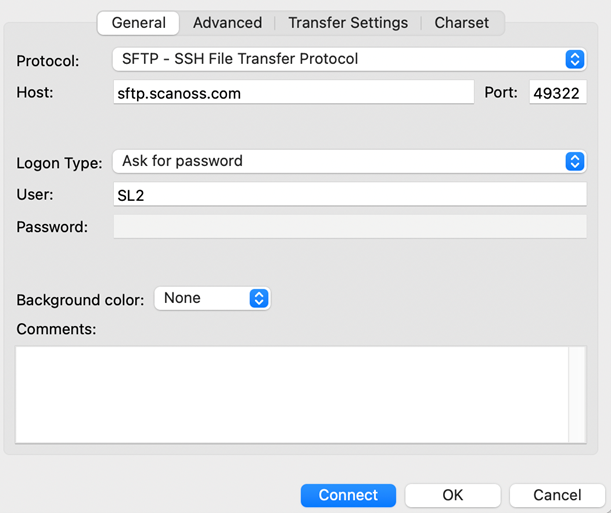
Updating the SCANOSS Platform
After downloading the update from the SFTP server, follow the instructions below based on the update type.Types of KB Updates
Daily Updates
- Contain the full vulnerability table.
- Download the latest
YY.MM.DD_vulnerability.tar.gzarchive. - Decompress and overwrite your current
ldb/oss/vulnerabilitydirectory.
Intermediate Updates
- Released fortnightly, containing frequently updated components.
- Download
YY.MM_<No>.tar.gzfromupdates/intermediate. - Decompress the archive into a directory named
mined, then import it into your Local Database (LDB). - Intermediate updates are also included in the following month’s monthly update.
Monthly Updates
- Released monthly, and include the intermediate updates from the previous month.
- Download the corresponding
YY.MMdirectory fromupdates/monthly. - Each update includes an instructions file, test files, and the latest KB statistics.
Importing the KB Update
Each KB update directory includes anupdate_instructions_YY.MM.txt file with detailed
import instructions.
Refer to the instructions file included in the update directory, as the import process
and required LDB software version may vary between updates.