Environment Variables
Set your API key as an environment variable to make it available across all SCANOSS CLI tools: macOS / Linux:
Note: After setting a permanent environment variable on Windows, open a new terminal session for the change to take effect. On macOS/Linux, run source ~/.bashrc (or the relevant profile file) or open a new terminal session.
SCANOSS-PY
To use the SCANOSS Python CLI, install it following the instructions in the repository, then run a scan using one of the commands below. Basic scan (no API key required):SCANOSS-JS
To use the SCANOSS JavaScript CLI, install it following the instructions in the repository, then run a scan using one of the commands below. Basic scan (no API key required):SCANOSS-CC
SCANOSS Code Compare communicates directly with the SCANOSS API and requires an API key to be configured before use. Configure with API key via environment variable:
Note: The --apiUrl flag value is case-sensitive. Use the URL exactly as shown above.
Verify your configuration:
Configuration settings are stored in the following file, depending on your operating system:
- macOS / Linux:
~/.scanoss/scanoss-cc-settings.json - Windows:
%USERPROFILE%\.scanoss\scanoss-cc-settings.json
Crypto Finder
Crypto Finder fetches remote cryptographic rulesets from the SCANOSS API. An API key is optional but recommended for access to the full curated ruleset. Configure with API key (persistent):- macOS / Linux:
~/.scanoss/crypto-finder/config.json - Windows:
%USERPROFILE%\.scanoss\crypto-finder\config.json
SBOM Workbench
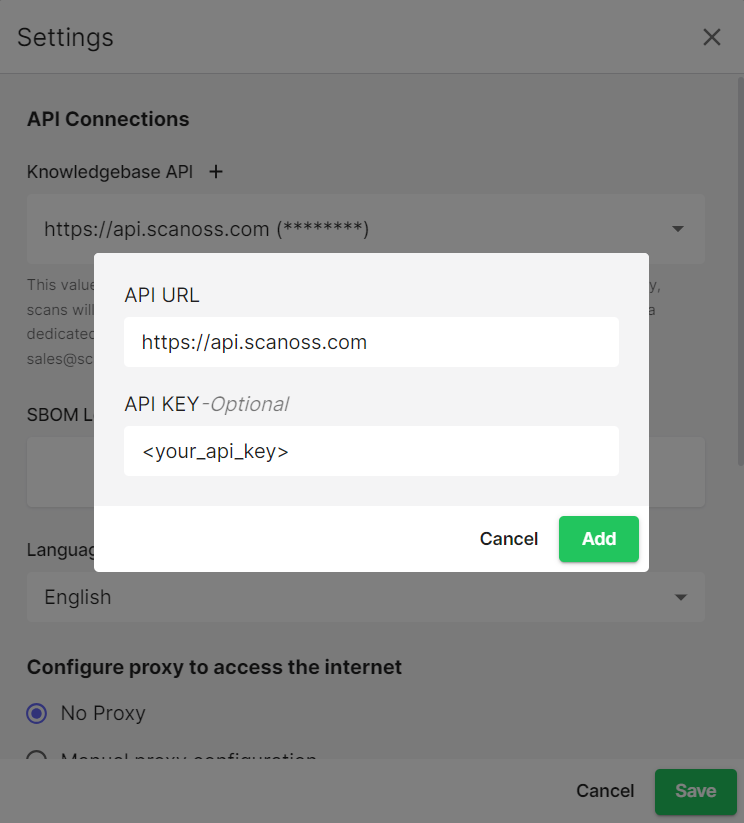
The SBOM Workbench can be configured to use your API key via the application settings:- Navigate to File → Settings
- Add a new API key entry by clicking the ’+’ button
- Complete the form with the following values:
- Base URL:
https://api.scanoss.com - API Key: your API key value
- Base URL: