

- The LDB — the database that will contain the Knowledge Base
- The SCANOSS Engine — the inventory engine that provides scanning and searching capabilities over LDB
- The SCANOSS Encoder Library — provides data encoding capabilities
- The API — provides a RESTful API for SCANOSS that can be accessed remotely by clients such as SCANOSS-PY
Secure Access
You will receive authentication credentials via email before you can access the SCANOSS Knowledge Base. If you have not received your credentials, contact support@scanoss.com.Connecting via the CLI
You can copy the Knowledge Base using a Secure FTP (SFTP) connection, authenticating with your provided credentials. Run the following command to connect:Downloading Files
Once connected, you will enter an interactive SFTP session where you can download files using theget command:
/ldb/compressed/ is required for the installation and must be downloaded locally.
To download an entire directory recursively, use the -r flag:
Connecting via an SFTP Client
Configure your preferred SFTP client using the connection details shown in the screenshot below. Ensure the protocol is set to SFTP, and enter the host, port, and credentials exactly as provided in your welcome email.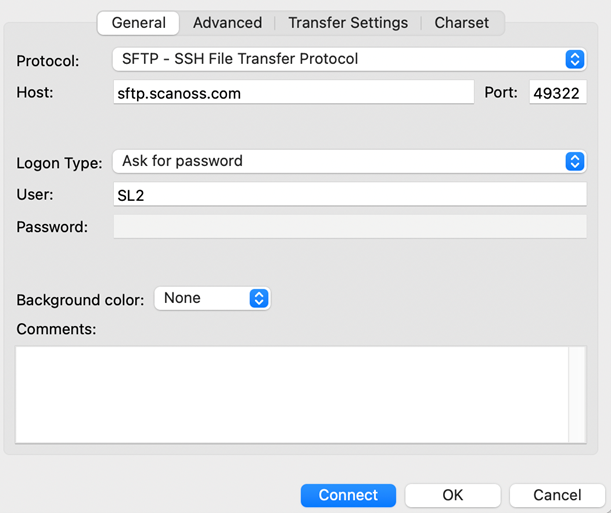
Usage Instructions
To use the downloaded Knowledge Base, place theoss directory under /var/lib/ldb/.
You can copy its contents directly to that directory, mount a volume, or create a symbolic link if the data resides on a separate disk or volume.
For example, if your LDB data is downloaded to /data/ldb, run the following to create a symbolic link:
Setting Permissions
After placing the Knowledge Base files, ensure that thescanoss user has ownership of the oss directory.
This is required to prevent permission errors at runtime:
root, the scanoss user will not have the necessary read permissions without this step.
Once all files are correctly placed and permissions are set, proceed with the
Installation from Sources to continue setting up your on-premise deployment.