

Prerequisites
Before you begin, make sure you have:- An existing GitHub repository
- A valid SCANOSS API key
How It Works
Understanding how SCANOSS integrates with your CI/CD pipeline helps you make the most of automated code scanning and compliance checks.CI/CD Pipeline Sequence Flow
The following diagram illustrates the complete flow when SCANOSS is integrated into your GitHub Actions workflow, including both success and failure scenarios.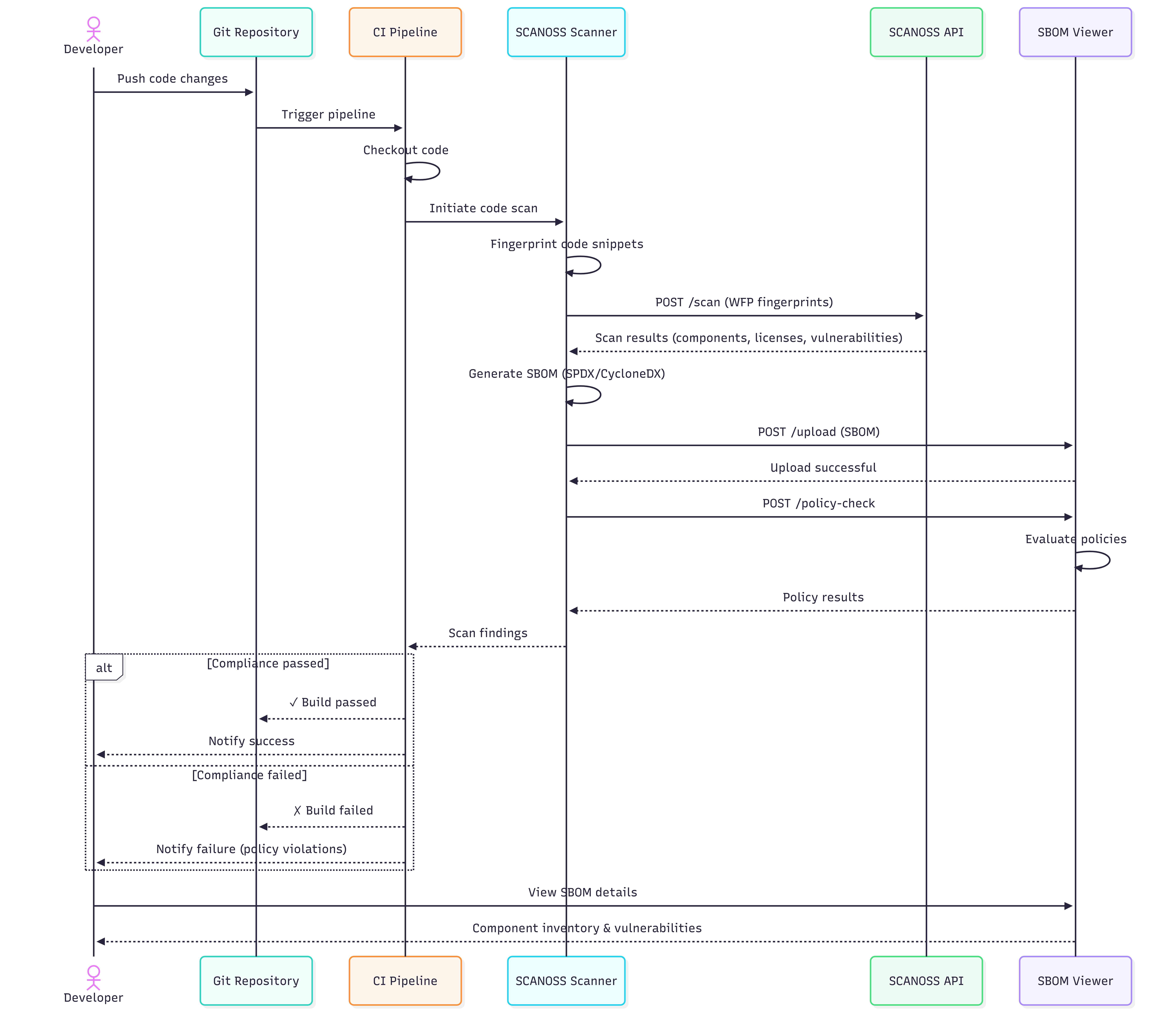
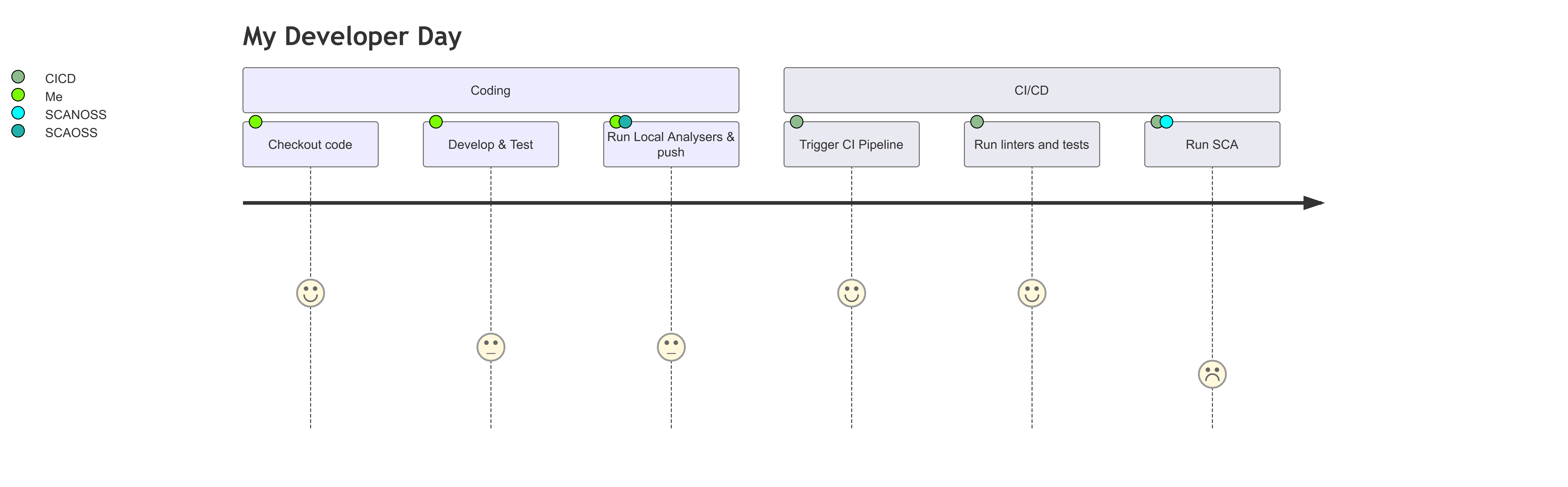
Developer Day Journey
Configuration
Navigate to your GitHub repository and add the following secrets: Settings → Secrets and variables → ActionsFull Scan on Push and Pull Request
Create a workflow file at.github/workflows/scanoss.yml and configure it to run SCANOSS:
Action Input Parameters
The SCANOSS GitHub Action accepts several input parameters to customise scanning behaviour.Action Output Parameters
The action produces raw scan data and metadata that can be integrated into other workflows or reporting tools.Policy Checks
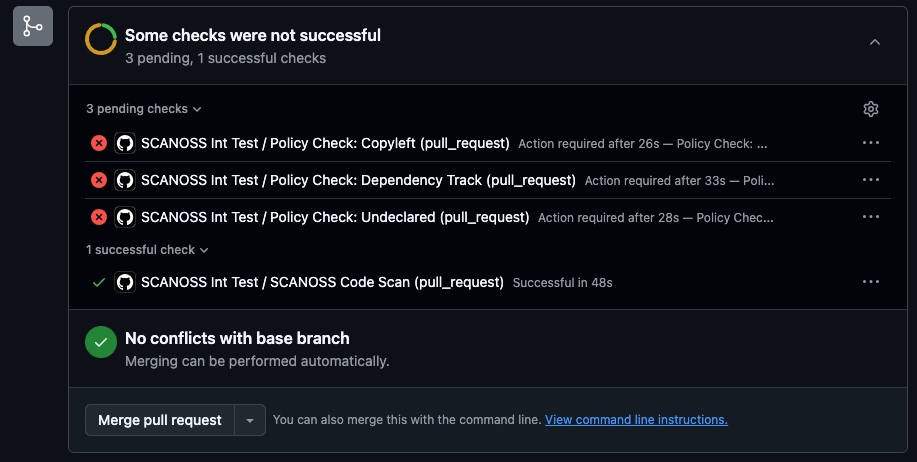
The SCANOSS Code Scan Action supports configurable policy checks to automatically enforce compliance during CI:-
Copyleft (copyleft or cpl) – Detects Copyleft-licensed components or snippets. If found, the pull request is rejected. The default Copyleft license list is defined in the SCANOSS configuration. The copyleft determination is performed by scanoss.py (
scanoss-py inspect copyleft), which uses the OSADL copyleft checklist as the default list. Both strong (Yes) and weak/restricted (Yes (restricted)) copyleft entries are treated as copyleft, and this includes-or-latervariants (e.g.GPL-2.0-or-later,AGPL-3.0-or-later). The default list can be customized with thelicenses.copyleft.include,licenses.copyleft.exclude, andlicenses.copyleft.explicitinputs. - Undeclared (undeclared or und) – Compares detected components against those declared in the scanoss.json file (configurable via settingsFilepath). Pull requests fail if undeclared components are found.
- Dependency Track (depTrack or dt) – Integrates with Dependency Track to check for vulnerabilities, license violations, and compliance. Requires deptrack.* parameters to be set.
Delta Scan on Push and Pull Request
Scan only the changes in your pull request to quickly identify issues without needing to re-scan the entire repository.Note: A fetch-depth of 0 is required to ensure the action can access the necessary commit history to perform the delta scan correctly.
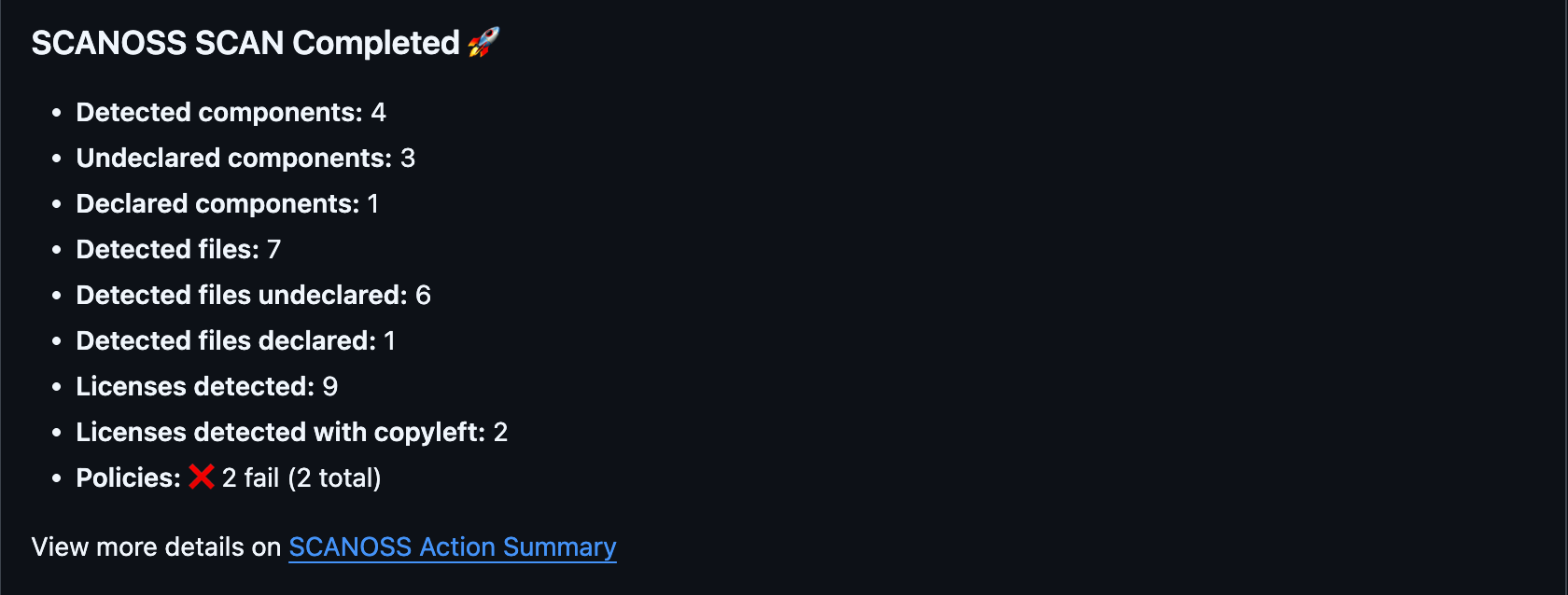
Understanding the Scan Summary
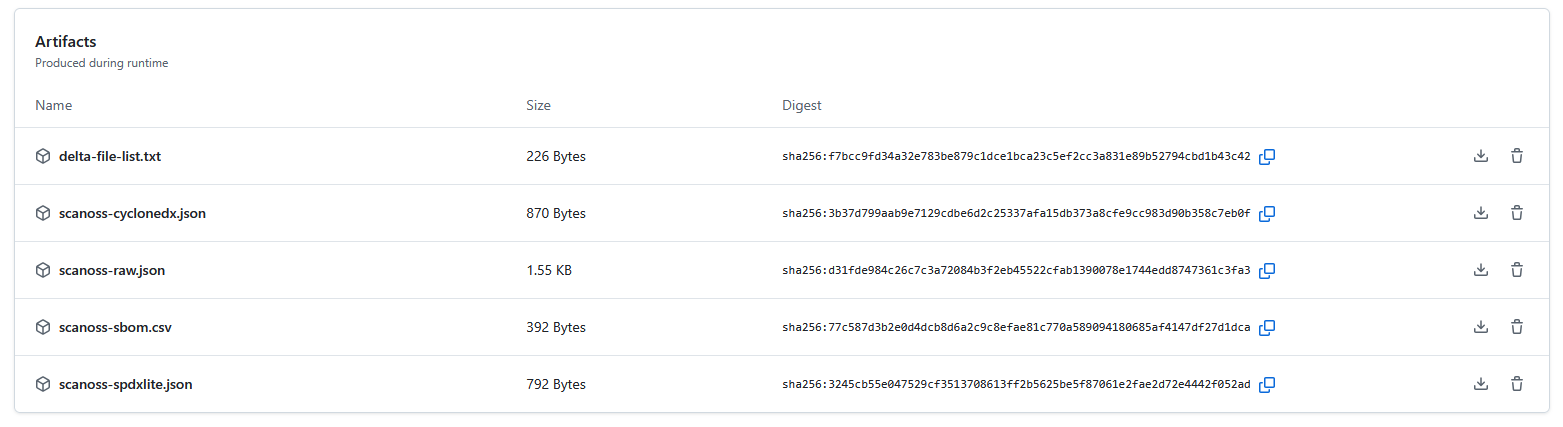
After a successful scan, GitHub Actions provides a comprehensive summary of the results. This summary offers immediate insights into the scanned files. Key details in the summary include:- Scan Report: Lists all detected licenses, policy evaluation results and the status of any configured integrations.
- Downloadable Artifacts: These include SBOM files and other detailed scan data. This data can be easily downloaded and used with various compliance and vulnerability management tools.
Simplified Dev CI/CD Pipeline Sequence Flow
For reference, here’s a streamlined view of the successful scan workflow.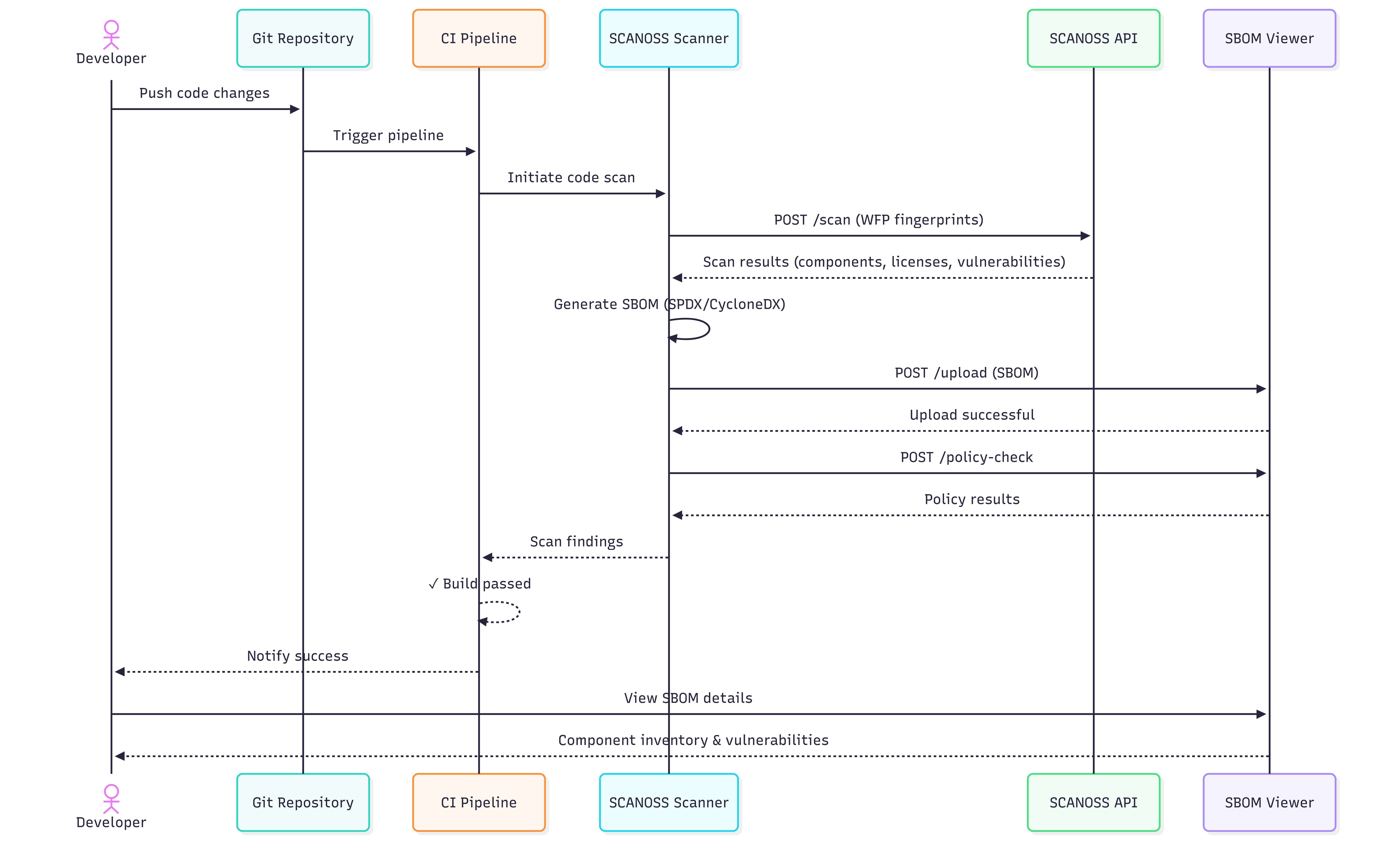
Manage Components with scanoss.json
The scanoss.json file is used for managing your project’s software bill of materials (SBOM). It allows you to declare approved components, document triage decisions and customise scan behavior to enforce your organisation’s policies. This guide walks you through setting up and using scanoss.json in a GitHub Actions workflow.Recommended .gitignore Configuration
When working with SCANOSS in your repository, we recommend the following.gitignore configuration:
scanoss.json file should be checked into Git and not added to .gitignore. This file contains your component declarations and governance decisions that should be version-controlled and shared across your team.
What to ignore:
*.wfp- Winnowing fingerprint files generated during local scans.scanoss/- Local cache directory created by SCANOSS tools
scanoss.json- Your project’s SBOM declarations and scan settings
File Structure and Location
For the SCANOSS action to automatically detect it, place the scanoss.json file in the root of your repository.Step-by-Step Guide to Populating scanoss.json
Follow these steps to create and manage your component declarations.Step 1: Run an Initial Scan
First, run the workflow without a scanoss.json file. This initial scan will discover all components present in your repository and report them as “undeclared.”Step 2: Review Scan Results
Once the workflow completes, navigate to the run in the Actions tab of your repository.- Review the Annotations on the summary page for a quick overview of component violations.
- Download the scanoss-raw.json.zip artifact, which contains the detailed SBOM.
Step 3: Extract Component PURLs
Unzip the artifact and use a command-line tool like jq to extract a unique list of component PURLs from the scanoss-raw.json file.Tip: jq is a lightweight and flexible command-line JSON processor. It’s an essential tool for scripting and automation. If you don’t have it, you can install it from here.
Step 4: Create Your scanoss.json File
Create a scanoss.json file in your repository root. Use the PURLs from the previous step to populate the bom.include section. Add comments to document why each component is approved.- bom.include: Lists all approved components. The scan will verify against this list.
- bom.remove: Specifies components that should not be present. The scan will flag them if found.
- settings.scan.ignore: Defines file or directory paths to exclude from the scan.
Step 5: Commit and Push
Add the scanoss.json file to Git and push the changes. This will trigger the workflow again.Step 6: Verify the Results
After the new workflow run completes, check the job logs for the Run SCANOSS Code Scan step. The output should now show that all components are declared and there are no undeclared components.SBOM Export (Dependency Track)
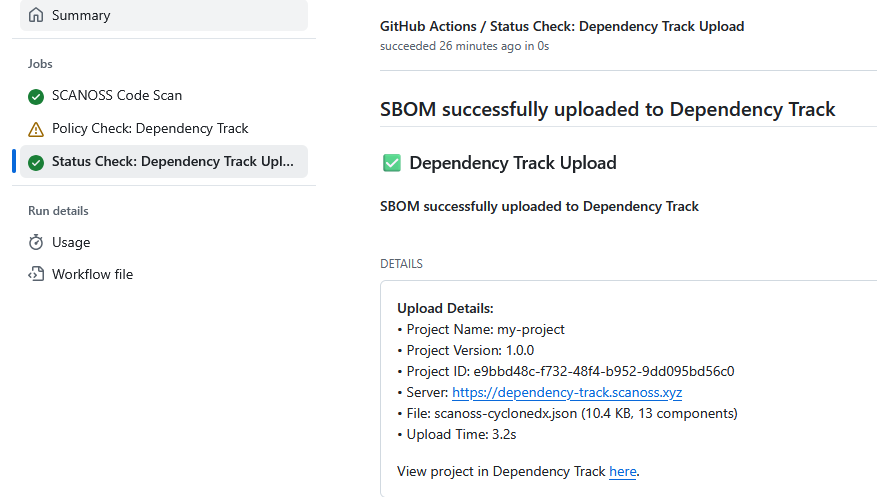
SCANOSS GitHub Actions can be configured to automatically export your SBOM to Dependency Track for enhanced vulnerability and license management. In your workflow file.github/workflows/scanoss.yml add the Dependency Track configuration to the scanoss step.
Troubleshooting
gRPC errors (403) when using older action versions
Symptom: The workflow fails with 403 errors during decoration service calls (dependencies, vulnerabilities, etc.). Cause: The gRPC endpoints have been decommissioned. All API communication now goes through REST.gha-code-scan v1.5.0 and earlier shipped with scanoss-py v1.46.0, which still used
gRPC for some service calls, this causes 403 errors against the current API.
Fix: Update your workflow to use gha-code-scan v1.6.2 or later, which bundles
scanoss-py v1.52.1 (REST-only):