When integrated with SCANOSS, it provides:
  • Comprehensive License Scanning: Detect licenses and copyrights using SCANOSS’s vast open source knowledge base
  • Policy Automation: Define and enforce custom compliance rules
  • SBOM Generation: Create CycloneDX and SPDX SBOMs
  • Automated Compliance: Generate attribution documents and compliance reports
  • Vulnerability Detection: Identify security issues in dependencies

Architecture Overview

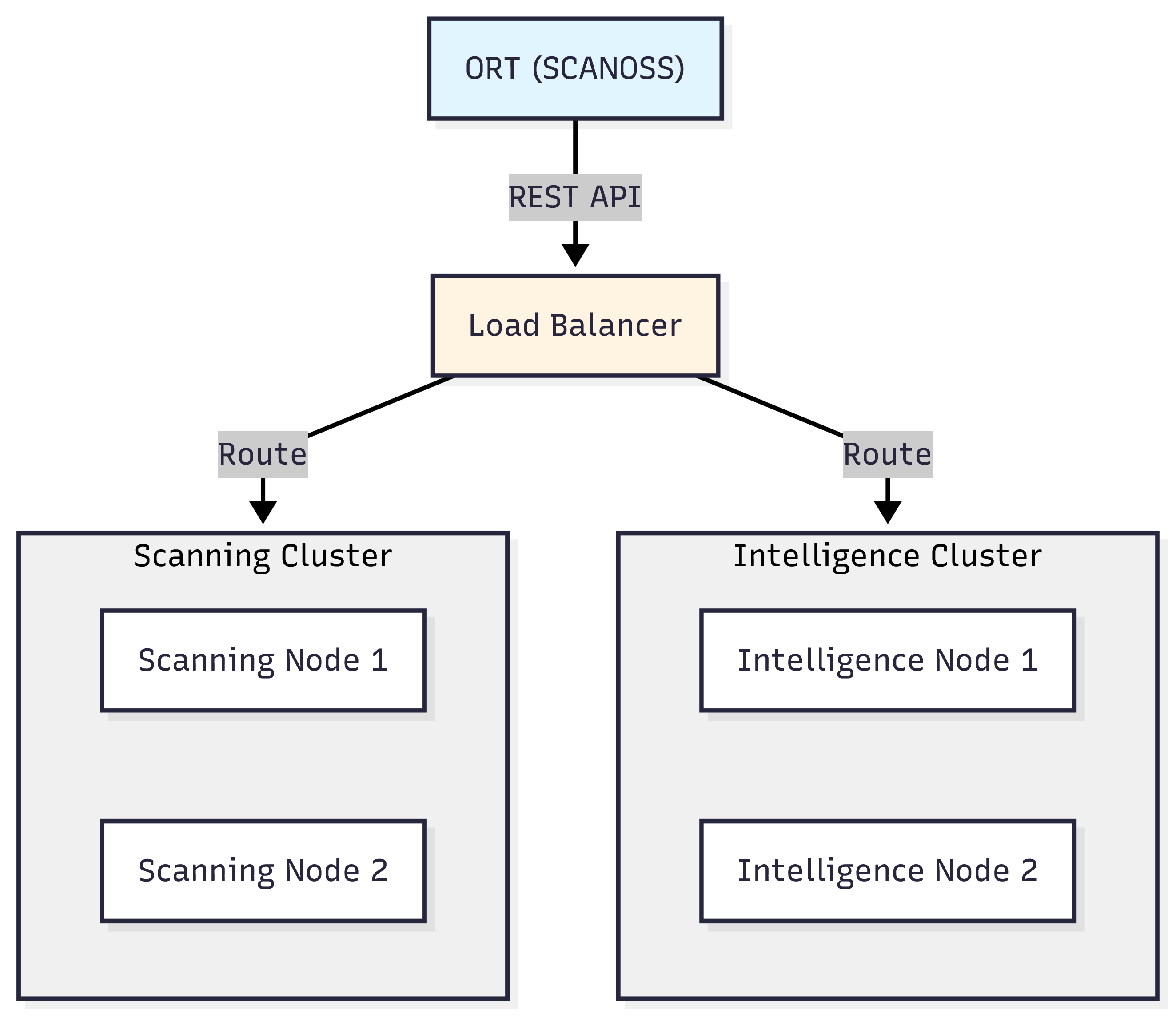
ORT Client-Server Architecture

ORT leverages a distributed architecture to efficiently process scans and deliver intelligence. ort-architecture
Prerequisites

  • Java: JDK 21 or later
  • Git
  • SCANOSS API key
  • Shell environment:
    • Windows: PowerShell, Command Prompt, or Git Bash
    • macOS/Linux: Terminal (Bash/Zsh)
  • Text editor: VS Code, Notepad++, nano, vim, or any editor of your choice

Installation

For Windows:
# Clone ORT repository
git clone https://github.com/oss-review-toolkit/ort.git
cd ort

# Build ORT using Gradle
.\gradlew.bat installDist

# Add ORT to your PATH (temporarily for this session)
$env:PATH = "$PWD\cli\build\install\ort\bin;$env:PATH"

# To add permanently, use System Properties > Environment Variables
# Or add to your PowerShell profile:
# notepad $PROFILE
# Add this line to the profile:
# $env:PATH = "C:\path\to\ort\cli\build\install\ort\bin;$env:PATH"

# Verify installation
ort --help
Configure Java Memory (Windows): Set via System Properties > Environment Variables:
  • Variable name: JAVA_OPTS
  • Variable value: -Xmx8g
Or set temporarily in PowerShell:
$env:JAVA_OPTS = "-Xmx8g"
For macOS/Linux:
# Clone ORT repository
git clone https://github.com/oss-review-toolkit/ort.git
cd ort

# Build ORT using Gradle
./gradlew installDist

# Configure Java memory (8GB recommended)
echo 'export JAVA_OPTS="-Xmx8g"' >> ~/.bashrc
source ~/.bashrc

# Add ORT to your PATH
echo "export PATH=\"$(pwd)/cli/build/install/ort/bin:\$PATH\"" >> ~/.bashrc
source ~/.bashrc

# Verify installation
ort --help

Configuration

Create the ORT configuration directory and file: For Windows:
# Create config directory
New-Item -ItemType Directory -Force -Path "$env:USERPROFILE\.ort\config"

# Create/edit configuration file using your preferred text editor
# For example, using Notepad:
notepad "$env:USERPROFILE\.ort\config\config.yml"

# Or using VS Code if installed:
# code "$env:USERPROFILE\.ort\config\config.yml"
Add the following content to config.yml:
ort:
  scanner:
    scanners:
      SCANOSS:
        options:
          apiUrl: "https://api.scanoss.com"
        secrets:
          apiKey: "your-scanoss-api-key-here"
Replace your-scanoss-api-key-here with your actual SCANOSS API key. For macOS/Linux:
# Create config directory
mkdir -p ~/.ort/config

# Create/edit configuration file using your preferred text editor
# Options include: nano, vim, code (VS Code), or any text editor
nano ~/.ort/config/config.yml

# Or use cat to create the file directly:
cat > ~/.ort/config/config.yml << 'EOF'
ort:
  scanner:
    scanners:
      SCANOSS:
        options:
          apiUrl: "https://api.scanoss.com"
        secrets:
          apiKey: "your-scanoss-api-key-here"
EOF
Replace your-scanoss-api-key-here with your actual SCANOSS API key.

How ORT Works with SCANOSS

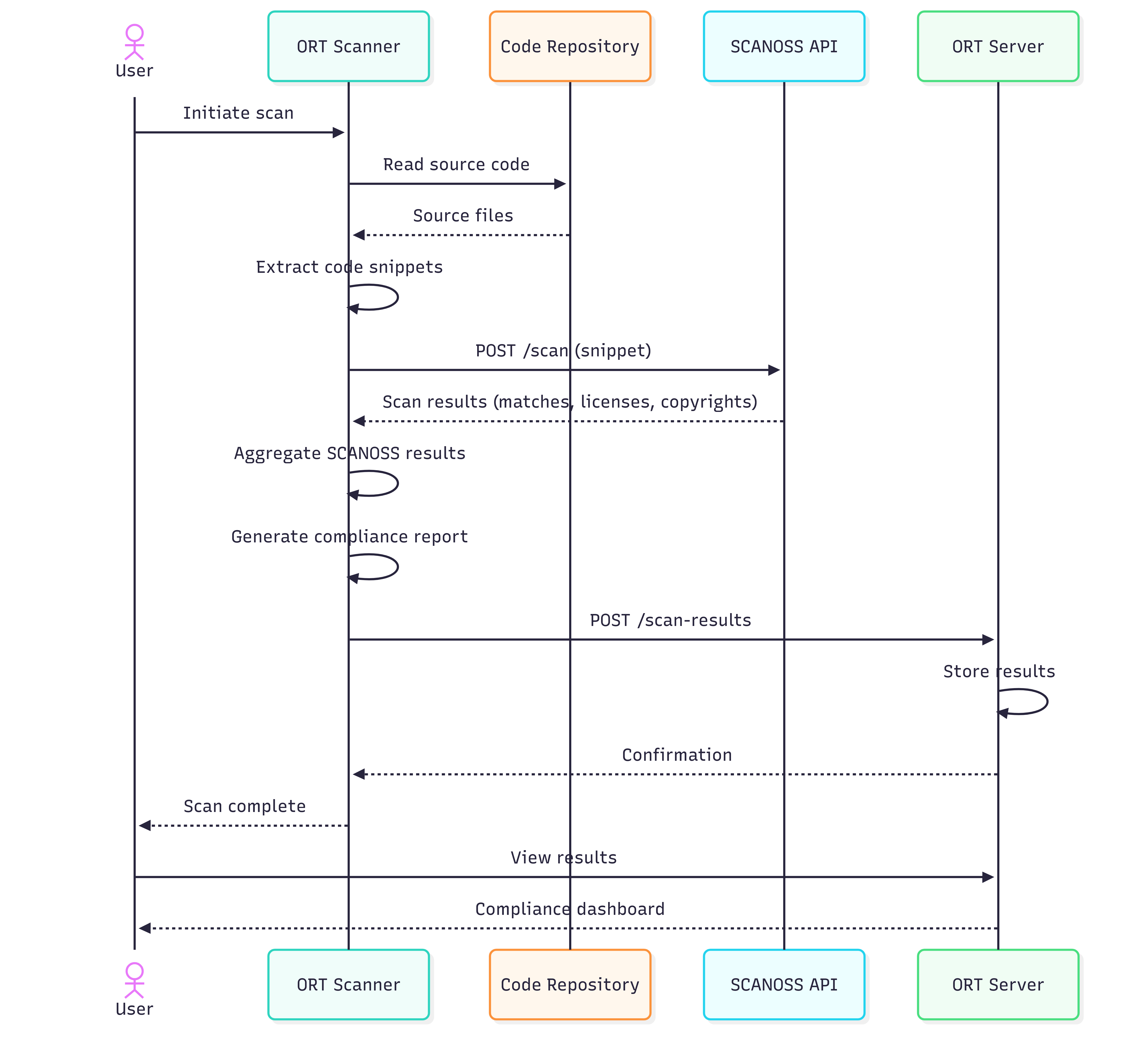
ORT Sequence Flow

Here’s how ORT orchestrates the scanning workflow when integrated with SCANOSS. ort-flow
Getting Started

Analyse Dependencies

# Run analyzer
ort analyze -i . -o ort-results

Scan with SCANOSS

# Scan for licenses and vulnerabilities
ort scan --ort-file ort-results/analyzer-result.yml --output-dir ort-results --scanners SCANOSS

Generate HTML Report

# Generate HTML report
ort report \
  --ort-file ort-results/scan-result.yml \
  --output-dir ort-results \
  --report-formats StaticHtml

View Reports

Open the generated HTML report in your browser: For Windows:
# PowerShell
Start-Process ort-results\scan-report-web-app.html

# Command Prompt
start ort-results\scan-report-web-app.html
For macOS:
open ort-results/scan-report-web-app.html
For Linux:
xdg-open ort-results/scan-report-web-app.html

Additional Formats

Generate reports in various formats.
# SPDX SBOM
ort report --ort-file ort-results/scan-result.yml \
  --output-dir ort-results --report-formats SpdxDocument

# CycloneDX SBOM
ort report --ort-file ort-results/scan-result.yml \
  --output-dir ort-results --report-formats CycloneDx

# Multiple formats
ort report --ort-file ort-results/scan-result.yml \
  --output-dir ort-results \
  --report-formats StaticHtml,SpdxDocument,CycloneDx

Policy Evaluation

Define and enforce custom compliance policies using ORT’s policy rules.

Create Policy Rules

Create a policy rules file using your preferred text editor: For Windows (PowerShell):
# Create policy rules file using your preferred text editor
# For example, using Notepad:
notepad "$env:USERPROFILE\.ort\config\rules.kts"

# Or using VS Code if installed:
# code "$env:USERPROFILE\.ort\config\rules.kts"
Add the following content to rules.kts:
/**
 * Minimal ORT Policy Rules
 */

import org.ossreviewtoolkit.model.*

ruleSet(ortResult, licenseInfoResolver) {
    // Simple rule: warn about packages without declared licenses
    packageRule("DECLARED_LICENSE_CHECK") {
        require {
            pkg.metadata.declaredLicenses.isNotEmpty()
        }

        warning(
            message = "Package ${pkg.metadata.id.toCoordinates()} has no declared license",
            howToFix = "Add license information to the package"
        )
    }
}
For macOS/Linux (Bash/Zsh):
# Create policy rules file using your preferred text editor
# Options include: nano, vim, code (VS Code), or any text editor
nano ~/.ort/config/rules.kts

# Or use cat to create the file directly:
cat > ~/.ort/config/rules.kts << 'EOF'
/**
 * Minimal ORT Policy Rules
 */

import org.ossreviewtoolkit.model.*

ruleSet(ortResult, licenseInfoResolver) {
    // Simple rule: warn about packages without declared licenses
    packageRule("DECLARED_LICENSE_CHECK") {
        require {
            pkg.metadata.declaredLicenses.isNotEmpty()
        }

        warning(
            message = "Package ${pkg.metadata.id.toCoordinates()} has no declared license",
            howToFix = "Add license information to the package"
        )
    }
}
EOF

Run Evaluation

For macOS/Linux:
# Evaluate policies
ort evaluate \
  --ort-file ort-results/scan-result.yml \
  --output-dir ort-results \
  --rules-file ~/.ort/config/rules.kts

# Generate report with evaluation
ort report \
  --ort-file ort-results/evaluation-result.yml \
  --output-dir ort-results \
  --report-formats StaticHtml
For Windows (PowerShell):
# Evaluate policies
ort evaluate `
  --ort-file ort-results/scan-result.yml `
  --output-dir ort-results `
  --rules-file "$env:USERPROFILE\.ort\config\rules.kts"

# Generate report with evaluation
ort report `
  --ort-file ort-results/evaluation-result.yml `
  --output-dir ort-results `
  --report-formats StaticHtml
For Windows (Command Prompt):
rem Evaluate policies
ort evaluate ^
  --ort-file ort-results/scan-result.yml ^
  --output-dir ort-results ^
  --rules-file "%USERPROFILE%\.ort\config\rules.kts"

rem Generate report with evaluation
ort report ^
  --ort-file ort-results/evaluation-result.yml ^
  --output-dir ort-results ^
  --report-formats StaticHtml